
Server-side GTM: what it is, why it matters, and how to actually deploy one
Every analytics engineer eventually hits the wall. Conversions stop matching what the CFO's dashboard says. Facebook's reporting drifts from Google's. Safari users look like they barely convert. The ad team's scratching their heads about why enhanced conversions are flatlined.
At some point the answer is no longer "fix the tags." It's "move the tags off the browser."
That's server-side GTM. Here's what it is, when it's worth the effort, and what a proper deployment actually looks like.
What problem is this solving?
Browsers have been progressively breaking analytics for years.
Safari's Intelligent Tracking Prevention caps third-party cookies at seven days. For a B2B SaaS with a 14-day trial, that means most trial-to-paid conversions never get attributed back to the ad that started them.
iOS private relay hides the client IP. Geographic reporting and fraud detection both degrade.
Chrome's privacy sandbox is changing how audience matching works. Third-party cookies are on a slow glide path to deprecation.
Ad blockers - the top five together are on roughly 30% of developed-market desktops.
Every one of those changes chips away at client-side measurement. Server-side tagging doesn't make the browser changes go away. It just moves the measurement logic somewhere the browser doesn't control.
How it works
Here's the shape.
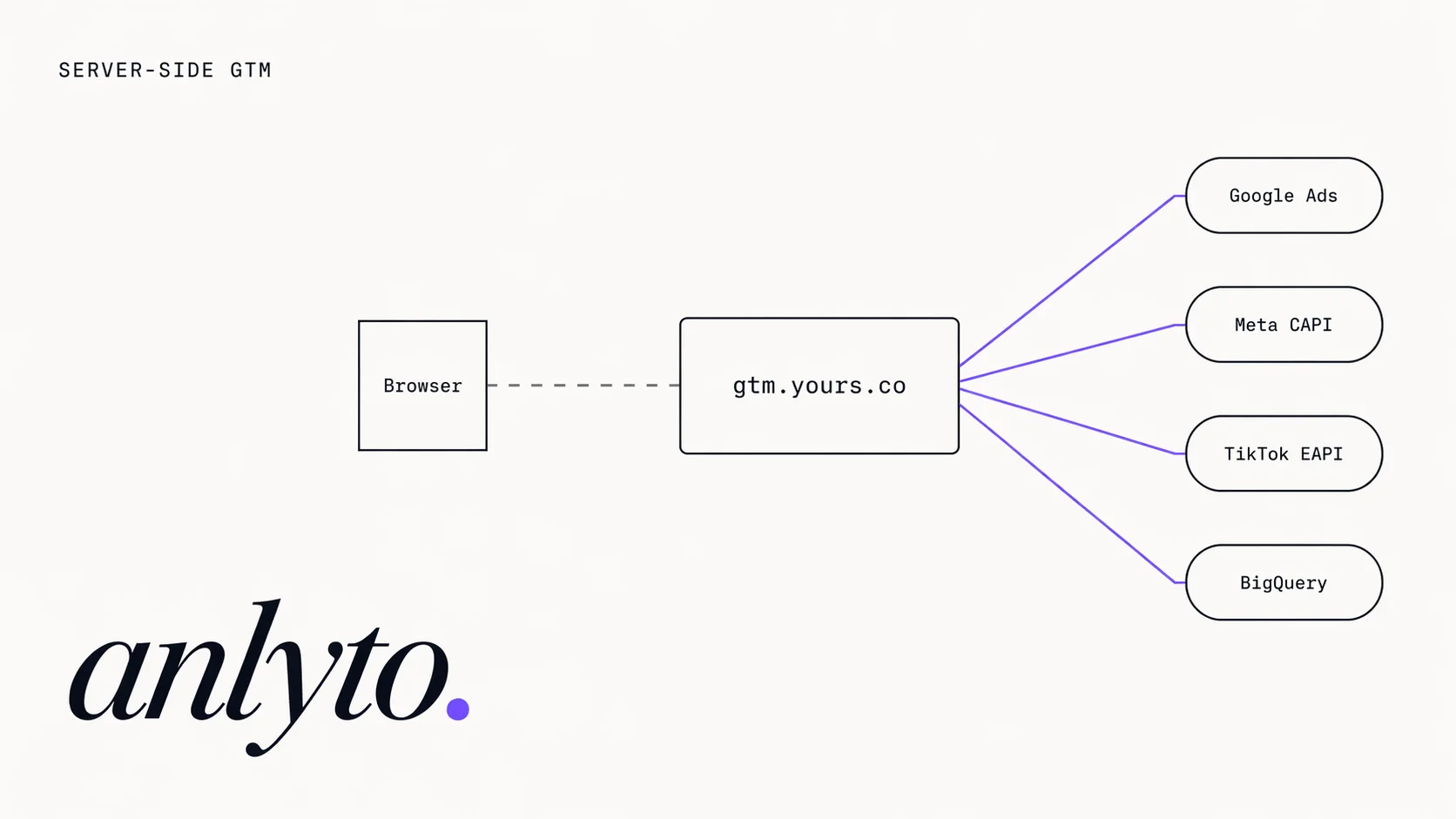
Before. The browser runs your GTM container. When a purchase event fires, your container makes one HTTP request to Google, one to Meta, one to TikTok, one to LinkedIn - each vendor sees the browser directly, sets their own cookies, and runs their own tracking logic.
After. The browser runs a stripped-down container that makes one HTTP request - to a container you control, running on your own subdomain (track.yourbrand.com). That container then fans out server-to-server to Google, Meta, TikTok, LinkedIn, and whoever else. Only one request leaves the browser; it goes to your domain; the cookies it sets are first-party.
The server container itself is just a small Node.js application running GTM's container runtime. You deploy it to Google Cloud Run, Fargate, or your own Kubernetes cluster.
Why it matters
Three practical wins, in order of how quickly they pay back.
1. Safari conversion recovery
ITP's 7-day cap breaks cookie-based attribution on Safari. With first-party cookies on your own subdomain, attribution windows stretch back to whatever you set them to - 90 days, 365 days, whatever your CMP allows.
For a B2B SaaS advertiser we audited in Q1 2026 (Anlyto engagement, 30-day post-rollout measurement window), Safari conversions recovered after the sGTM rollout were worth roughly 24% of their Google Ads-attributed revenue. Not 24% lift - 24% that was already happening but wasn't getting credited. Measured by comparing Google Ads enhanced conversions before and after sGTM, holding ad spend and audience targeting constant.
2. PII control
Every marketing vendor wants email addresses, phone numbers, and user IDs. Most of them want more than you're legally allowed to share. Server-side gives you one place to strip, hash, or normalise that data before it leaves your infrastructure.
Hash the email once in your sGTM container; Meta and Google both see the hashed version; your legal team doesn't have to audit vendor-by-vendor PII handling.
3. Page speed
The typical ecommerce page runs 20+ third-party scripts - GA4, GTM, Meta pixel, Klaviyo, HotJar, intercom, etc. Server-side tagging collapses most of those into one script. LCP drops 200-400 ms for sites we've rebuilt (measured via PageSpeed Insights mobile lab data, three Anlyto rebuilds in 2025-2026). That's not just a vanity metric - it's Core Web Vitals and conversion rate both.
When it's not worth it
Don't deploy sGTM if:
- Your traffic is under about 50K sessions/month and your business isn't privacy-regulated. The payback period stretches too long.
- Your current tracking is unaudited. sGTM won't fix broken tag firing. Audit first, deploy server-side second.
- You don't have anyone who owns the infrastructure. Cloud Run is cheap ($40–$150/mo for most traffic profiles) but somebody has to monitor it.
The deployment, step by step
This is how we roll out an sGTM deployment. Timing below assumes a single web property; add two weeks per additional property.
Week 1 - feasibility
- Audit the current GTM container. Identify which tags make sense to move (conversion tags are high value; page view tags often stay client-side).
- Confirm consent-mode v2 is configured cleanly on the client side. If it's broken, fix that first.
- Pick a subdomain (
track.yourbrand.comor similar). DNS gets set up now. - Pick infrastructure. Cloud Run is the default. AWS Fargate if you're already deep on AWS. Self-hosted Kubernetes only if compliance requires it.
Week 2 - infrastructure
- Deploy a server container via GTM's "auto-provision" flow. That gives you a Cloud Run service, a load balancer, and a managed SSL cert.
- Point your subdomain's A record at the load balancer. Verify HTTPS end-to-end.
- Set up Cloud Logging and latency alerts. You want to know within minutes if the container starts erroring.
Typical Cloud Run cost at this point: $40–$80/mo for up to a few million requests per day.
Weeks 3–4 - tag migration
Move tags one at a time. Each tag gets:
- A server-side clone that receives the event from the client.
- A deduplication mechanism - typically a
transaction_idorevent_id- so Google and Meta don't count the conversion twice. - QA in dev before the client-side version gets disabled.
Order we typically move in: Google Ads → Meta CAPI → GA4 (if not already server-side) → TikTok → LinkedIn.
Week 5 - QA and hand-off
- End-to-end testing: fire a conversion on the real site, verify it lands in every destination, verify the dedup key works.
- Shadow mode for a week - client-side and server-side both fire, you compare volumes and reconcile any gap.
- Flip the client-side tags off, monitor for 48 hours, document the final architecture.
Total timeline for a standard deployment: 5 weeks from feasibility to go-live, give or take one week for ecommerce complexity.
Common pitfalls
Double-counting. Every tag that moves server-side needs a dedup key. Forgetting this gives you 2× conversions for a week before someone notices.
Missing consent signals. Your client-side container still sets consent; your server container needs to read it from the request and respect it. Easy to forget; breaks GDPR compliance if you do.
Overloaded container. sGTM has per-request compute limits. If you run 30 tags synchronously against each event, some requests time out. Fan out asynchronously where you can.
Silent Cloud Run failures. When the server container errors, nothing breaks visibly - the tags just don't fire. Set up Cloud Logging-based alerts for non-200 responses from day one.
Is it worth it?
For mid-to-large advertisers running >$10K/mo in paid media, or any B2C brand with significant Safari traffic, yes. The infrastructure costs are low and the measurement recovery usually pays back inside one quarter.
For small sites running on platform defaults, wait. Fix client-side first, then reassess at the next scale jump.
If you want a real answer for your specific stack, book a feasibility call and we'll go through it. Thirty minutes, no deck, honest opinion.
Related Anlyto services:
- Server-side GTM - the productized engagement built around the architecture in this post.
- GA4 + GTM Setup - clean client-side foundation that server-side runs on top of.
- Marketing Analytics - what to do with the conversion data once it is reliable.